 Indaba
Playbook
Recipes for working with Indaba, one way of working at a time. Each one says when to use it, the commands, what you should see, and what to do when you do not. The reference for every option is Getting started; the workflow file is in Workflow format.
The examples below use examples/board-handoff.workflow.ai.yml: two
steps where the second reads what the first learned. Replace indaba with npx indaba if you have not installed it.
| I want to | Go to |
|---|---|
| check a file before I spend anything | Check a workflow |
| see what a run will do and what each step may share | Plan a run |
| run a workflow and read the result | Run it |
| watch a run in the terminal, live or later | Watch a run |
| read what the steps told each other | Reading the board |
| have two agents argue until they agree | A debate |
| watch in a browser | The web view |
| build a whole app from an idea and see what Indaba can do | Cookbook: idea to app |
| build an app with every stage explained | Cookbook: CRUD, step by step |
| see what each stage of such a run produces, and where the code is | Cookbook: what each stage produces |
| learn what to write (idea, specs, skills, rules) to get the best result from such a run | Tutorial: get the best result |
| write the specs yourself and have agents review each spec and its code | Cookbook: you write the specs |
| find out why a run failed | When a run fails |
| script Indaba or run it in CI | In a script or in CI |
| choose which cookbook to follow | Choose a way of working |
Choose a way of working#
The cookbooks build an application in three different ways. The difference is who writes the specification: the spec is where the decisions are made, and every test and line of code is written from it.
Suggested for an application you will keep: you write the specs (run end to end with real agents on four features; see its last section). You write each
feature's spec by hand, Indaba has two agents review it before any code exists and review the code afterwards, and
once the loop is familiar you keep it as a workflow.ai.yml that builds the next spec you write. Every decision in the
app is one you made or accepted, and the review catches the gaps (a missing status code, an unstated limit, a security
hole) while fixing them costs a sentence. It asks the most of you: a spec per feature, and reading each review.
The other ways show what Indaba can do with less of you in the loop:
| Cookbook | Who writes the spec | You write | It shows | Use it to |
|---|---|---|---|---|
| You write the specs (suggested) | you | the constitution, AGENTS.md, every spec |
review debates over a spec and over code, a spec gate, tests first, a test gate with retries, the process kept as a workflow | build an app you will maintain |
| Idea to app | agents, after debating your idea | a few sentences in idea.md |
the whole chain with no person in it: a debate, spec-kit, AGENTS.md, skills, tests, code, a test gate and mutation testing |
see what Indaba does end to end; a prototype |
| CRUD, step by step | an agent, from the feature description in the workflow, then a review debate and a clarify step | the feature description (the contract) and an acceptance test | every stage explained: spec-kit's skills, a project skill, checkpoints, three gates (tests, an acceptance test no agent can edit, mutation testing) | learn each stage; borrow a gate for your own workflow |
Two pages go with the agent-written cookbooks: what each stage produces (the files, with real excerpts) and get the best result (what to write in the idea, rules and skills, and how to fix a bad result).
In the agent-written ways, the agents decide whatever the idea leaves open: in one quick-start run the spec recorded 17 decisions the two-sentence idea never made. They were reasonable, and they were not the author's. If you want agents to draft the spec but still own it, the middle way is to run the CRUD recipe in two halves and edit the spec between them: see Review the spec before any code is written.
The ways mix. A spec-first project can add the CRUD recipe's acceptance test and mutation gate to its workflow.ai.yml,
and an app started with idea to app can continue spec-first: from then on, write each new feature's spec yourself.
How these recipes relate to the SDD frameworks (Spec Kit, OpenSpec, BMAD, Kiro), what has been measured about them, and which pattern suits a bug fix, a brownfield feature or a change across components: see Spec-driven development a year on.
Check a workflow#
Use it every time you edit a file, and before the first run.
indaba validate examples/board-handoff.workflow.ai.yml
You should see board-handoff is valid (2 steps, 2 roles). and exit status 0. A problem is printed with the path of the
field (steps[1].board.read.steps[0] "nowhere" is not a step) and the status is 1. Fix the first one and run it again:
a file with a broken field is reported in one go, and problems that depend on the whole workflow (a step that is not an
ancestor, a cycle) appear once the fields themselves are sound. validate starts nothing and costs nothing.
Plan a run#
Use it to see the order of the steps, who runs each, and what each one reads from and may post to the board.
indaba plan examples/board-handoff.workflow.ai.yml

A step with no board line neither reads nor posts. reads nothing; may post result, fact is a step that leaves notes but
takes none; reads research (result, fact), at most 4000 characters is a step that gets a section of notes added to its
prompt. If a line is not what you meant, fix the board: field before you run.
Run it#
Use it when the file validates. This starts the agents, so it costs what they cost.
indaba run examples/board-handoff.workflow.ai.yml
Each step's changes PENDING -> RUNNING -> VALIDATING -> COMPLETED are printed, and the last line gives the task, its
final state and the trace id:
Task demo finished: COMPLETED (trace 9ad25c8a0001ea4000c2056f6acd2bf7)
The exit status is 0 when it completed, 1 when it failed, 2 when a human is needed (a debate no one could settle) and 130
when it was cancelled. Useful options: -w <dir> runs it against another project, --timeout <secs> limits a step (a step's own timeout_seconds wins over it),
-v prints what each span cost and -vv also streams the agents' output, --permissions read lowers what agents may do
for this run only, and --parallel <n> sets how many steps may run at once (default 1; above 1, steps that work in a worktree run together,
see Steps at the same time).
What a run leaves behind is under .indaba/ in the project: traces/<id>.jsonl (the spans), traces/<id>.events.jsonl
(what watch reads), traces/<id>.board.jsonl (the board), logs/ and, for debates, discussions/.
Watch a run#
watch only reads those files, so you can start it before, during or long after the run, from a second terminal, and
it never touches the run.
indaba watch                    # the runs, newest first
indaba watch latest             # follow the newest, or read it if it has finished
indaba watch latest --replay    # play a finished run back with its original timing (--speed 10 is ten times faster)
indaba watch latest --plain     # lines, not the dashboard
The home screen: bare indaba on a terminal lists the runs of the project (j k to move, Enter to open one in the dashboard, n to start a workflow (it shows what the run needs first when something is missing, and c confirms an item for that run) after confirming what it uses, s to stop a run started there, r to refresh, ? for the keys, q to quit). Without a terminal, or with INDABA_NO_TUI=1, it is the usage error it always was.
The dashboard (@indaba/tui, installed with indaba) opens on a terminal. The steps are on the
left and the output of the selected one on the right; below 80 columns they stack.

| Key | Does |
|---|---|
↑ ↓ or j k |
select a step (or scroll, once you press tab) |
g G |
first or last step |
PgUp PgDn |
scroll the output |
f |
follow the newest output |
tab shift-tab |
move the arrow keys to the next or previous area: the steps, the detail and the board |
b |
the board: the same as tab to it (below 160 columns it takes the place of the detail; on a wide terminal it is docked and b moves the arrow keys to it and back) |
r o |
show the reasoning of the step, or its output again; each keeps its own place |
[ ] |
move between the panes of the running steps |
Enter z |
enlarge the focused pane; Esc puts it back |
? |
list the keys |
q |
quit (it asks what to do with a run it started) |
Where the arrow keys are. Each area has a title row (from 12 rows up): ▶ Steps, ▶ Detail: <step>, ▶ Board. The one
with the arrow keys is inverse and starts with ▶ (> with --ascii), the others are dim, so it shows without colour. The
bottom line names the same area, says what the arrows do there and which area tab goes to next. tab visits the steps,
the detail and the board in that order at every width; where the board is not docked, it is shown in place of the detail
while it has the arrow keys (the title says "Board (replaces Detail)") and the detail comes back when you leave it. Under 12
rows there are no titles and the bottom line alone carries the ▶ and the name. The running steps' panes are a separate
block, labelled on the line under it (Running steps 2 of 5 [ ] move); [ ] move inside it whichever area has the arrow
keys.
States are a symbol and a word, never colour alone. --ascii avoids box and arrow characters and NO_COLOR turns colour
off.
Plain output is what you get with --plain, without a terminal, and in a pipe. It ends with the board when the run
has one, and the exit status is the run's: 0, 1, 2, 130, or 3 when the files end without a final state.
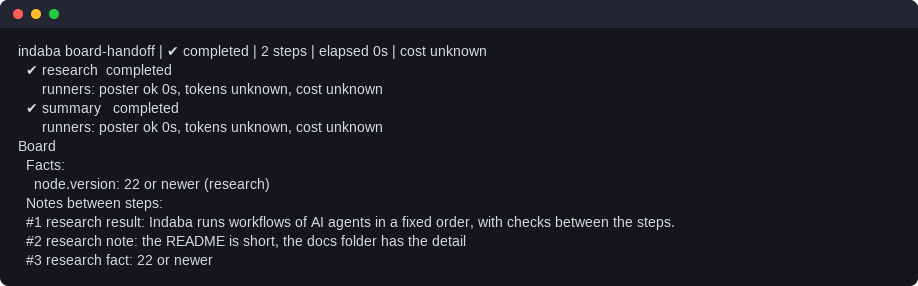
Start and watch in one go with indaba run <file> --tui. Quitting the dashboard asks whether to detach (the run goes
on and indaba watch <run> picks it up again), cancel it, or stay.
Reading the board#
Use it to see what the steps told each other, while a run goes or afterwards. Press b in the dashboard.
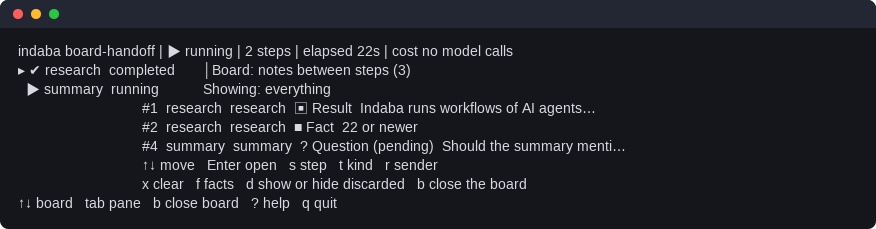
Each line is #number step sender kind text. The kind is a word and a symbol: Note, Question, Result, Fact, Decision,
and for a debate Proposal, Critique and Agreement. An entry whose step is still running is marked (pending): you can
read a step's notes while it works, but the next step will not see them until the step has completed. Entries that were
thrown away because their step failed (discarded), or replaced because a retry started over (replaced), are hidden;
d shows them.
| Key | Does |
|---|---|
↑ ↓ j k |
move; g G jump to the first or last entry; PgUp PgDn page |
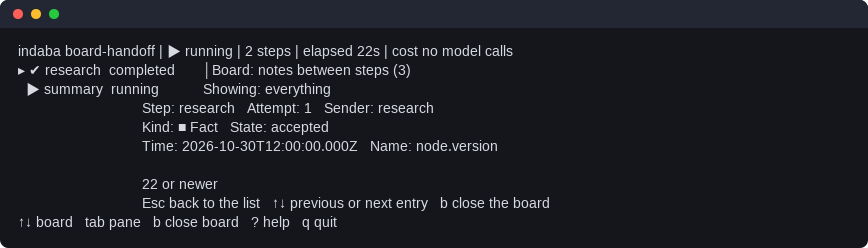
Enter |
open the entry in full; Esc goes back |
s |
only the step selected in the step list; press again to clear |
t |
cycle the kind: each kind that is on the board, then all |
r |
cycle the sender |
x |
clear every filter |
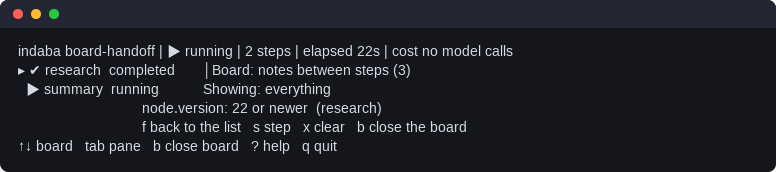
f |
the facts: the current value of each, and the step that set it |
d |
show or hide discarded and replaced entries |
b or Esc |
close the board (docked: hand the arrow keys back to the steps) |
On a wide terminal (160 columns or more, and a run that has a board) the board is docked on the right, beside the steps
and their output, and you see the discussion and the step in progress without pressing anything. b then moves the arrow
keys to the board and back, tab goes round the steps, the detail and the board, and Esc hands the arrow keys back to
the steps. The width is a first choice, not a measurement; below it, b swaps the board in for the output as described here.

Which keys apply depends on where the arrow keys are, and the title marked ▶ and the bottom line say where that is: after
b they are on the board, and tab moves them on to the step list. That is why f follows the output in the step list and shows the facts on the board.
The pane says what it cannot show: No board file yet (the run has not written to it), There is no board for this
run, The board is incomplete (part of it could not be saved, so some notes are missing), The board reached its size
limit (later notes were not kept) and how many lines of the file could not be read. Without a terminal, watch --plain
gives the same content as lines. The file itself is .indaba/traces/<id>.board.jsonl if you want to read it with
another tool; its format is in specs/run-blackboard/data-model.md.
To make steps share notes, write a board: field on both sides, as in
The board, and tell the first agent in its goal to end with BOARD ...
lines. If the second step does not seem to get them, work down this list: indaba plan shows reads on the second step
and may post on the first; the first step completed (a failed step's notes are discarded); the second step depends on the
first, directly or not; the agent's lines start at the very first character of a line and are outside a code fence; and
indaba watch latest --plain lists the notes. The span of the first step counts indaba.board.posted and
indaba.board.ignored.
A debate#
Use it when you want two or more agents to challenge each other, as in a review.
steps:
  - id: review
    role: claude
    consensus_with: [antigravity]
    decision_type: consensus
    arbiter: human
    goal: ...
Run it as above. Nothing else is needed to see it on the board: the messages appear as Proposal, Critique and Agreement
with the round, followed by one Result (stalled after 2 round(s). Open objections: ..., or the agreement) and, when a
person or an arbiter ruled, a Decision. Open the board with b and use t to look at the critiques only. The full
transcript and the rulings are kept as before; see Workflow format. A step after
the debate can read all of this with board: { read: {} }, even when the debate ended without agreement.
The web view#
Use it when you prefer a browser, or to edit workflows as a form or a graph.
indaba ui
It prints a local address with a token and keeps running until you stop it; runs, workflows, editing and the logging
settings are in The web view. The page does not show the board yet; the dashboard and watch --plain do.
When a run fails#
indaba watch latest --plainshows which step failed, its reason, and the board.indaba watch latest --replay --speed 10plays it back; add--outputto see what each step printed, and--thoughtsto see what the model wrote while thinking (kept apart from the output, and only for runners that stream it).indaba report latestgathers the log, trace and environment into a folder to attach to an issue. Secrets are removed from it.- The logs are in
.indaba/logs/; Logging says how to change the level and where they go.
A step that failed has its notes discarded, so the steps after it do not read them. A retry starts from a clean board for the steps it resets and carries only the last failure.
In a script or in CI#
indaba validate flow.workflow.ai.yml && indaba run flow.workflow.ai.yml -w "$PWD" --timeout 600
echo $?
Everything is arguments and exit statuses: 0 completed, 1 failed, 2 escalated, 130 cancelled. A step at permission level
full needs a terminal to ask at, or --allow-full-access when there is none. indaba plan and indaba run print a readiness report first (missing programs and keys by name, files, and what the workflow lists under requires); it never changes the exit status, and --confirm <id> confirms an item only a person can judge. A workflow can ask for a folder, a topic or a choice with inputs: give each with --input name=value, or indaba run asks at a terminal; plan shows which are still missing, and a bad or missing one stops the run before anything is created (exit 2). The terminal Home and the web page's Run panel show the same report before a start, with a key or a button to confirm for that run; they never stop a start either. Keep keys in the environment
(OPENROUTER_API_KEY and the like) and never in the workflow file. A step's agent or command sees only the basics and its own
provider's variables, not the rest of your environment, and its TEMP is inside the step's folder; a step in a worktree that
changes a branch or tag of the repository fails and the change is undone. indaba schema prints the JSON Schema of the file for
an editor, and indaba catalog lists the runners, guard types and arbiters this installation offers.
Spend differently#
Each role has its own model, so a run can use a stronger one where a mistake is costly and a smaller or local one
elsewhere. Change one role, run the same task again with indaba run -v, and compare both the cost and the result.
A cost shown as absent is unknown, not zero, and Indaba has no spending ceiling yet. The ideas, and what to record
when you compare, are in Spending less: experiments.
When a call goes quiet#
A model call can stop making progress without failing. timeout_seconds on a step limits how long a call may take; stall on
a step stops it when it has shown no sign of life for a while, and can run the step again from where it began:
- id: implement
  isolation: git_worktree
  stall: { after_seconds: 300, retries: 1 }
It is off unless you write it, after_seconds starts at 60, and only runners that can report activity may use it (today
claude-code). Set it well above the longest quiet stretch of the step, such as a test run that prints nothing for minutes.
A stalled attempt fails with Stalled: no activity for N seconds. as the step's reason, in indaba watch and the trace; it is not a timeout. The
details, and what a retry puts back, are in workflow-format.md.
Where to go next#
- Workflow format for every field
- Spending less: experiments for ideas to try with models, local servers and shell steps
- Extending to add a runner, a guard or a listener
- Logging when something needs finding